Keep working when the connection drops
What the phone still does with no connection, and how the work you save reaches the practice afterwards.
- Where
- Practice phone app
- Who can do this
- Administrator, Doctor, Midwife, Nurse, Reception, Billing and Staff
Network in a practice comes and goes. A phone set up with RizCare keeps the practice's records on it, so you can carry on seeing patients when the connection drops, and your work reaches the practice when it comes back.
Steps
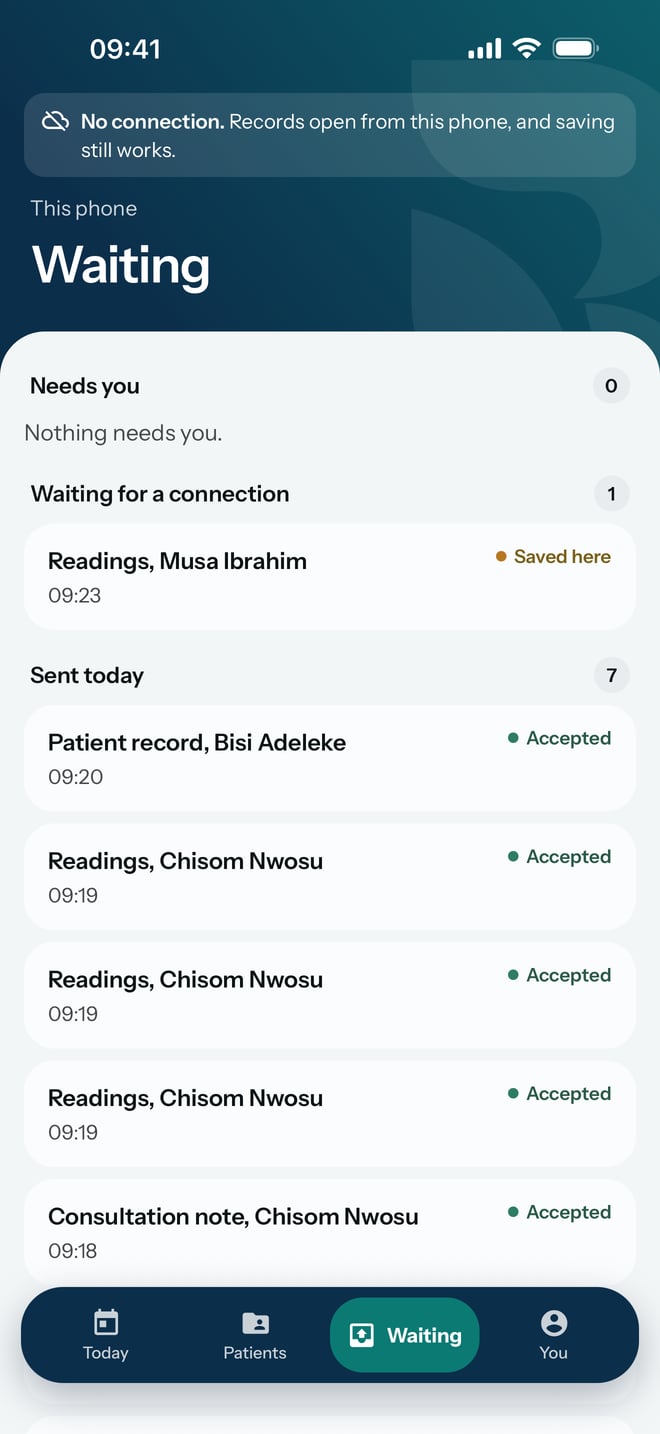
- Carry on as usual. At the top of the screen RizCare shows No connection. and says that records open from this phone and saving still works.
- Open a patient's visit from Today as normal.
- Record readings on the visit and tap Save reading. It saves on the phone.
- Tap Waiting to see what is held. It is listed under Waiting for a connection, marked Saved here.
What to expect
When the connection returns, the No connection. line goes away and the held work is sent. On Waiting it moves to Sent today, marked Accepted. Nothing you saved while offline is lost, and you do not type any of it again.
The records on the phone stay encrypted whether you are online or not, and they open only with your password.