See what is waiting to send
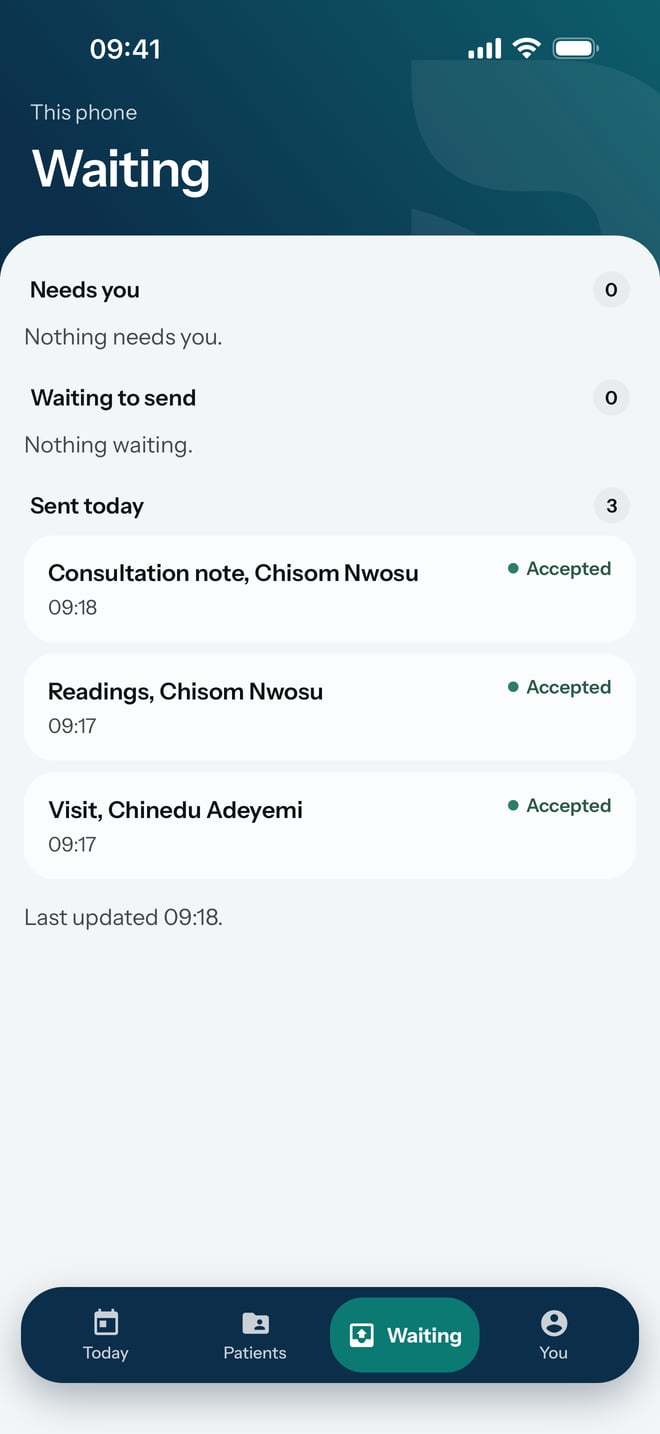
Check on the Waiting screen what this phone has sent to the practice today and what it still holds.
- Where
- Practice phone app
- Who can do this
- Administrator, Doctor, Midwife, Nurse, Reception, Billing and Staff
Everything you record on the phone is saved on the phone first and then sent to the practice. Waiting is where you see how far each piece of work has got, so you know when it is safe to hand the phone on or let the battery run down.
Steps
- Tap Waiting at the bottom of the screen.
- Read the three groups: Needs you, Waiting to send and Sent today.
- Check the line at the bottom that says when the phone last updated.
What to expect
Each item names the work and the patient, such as a visit, a set of readings or a consultation note, with the time it was saved. Its label says where it is:
- Saved here: on this phone, and it has not reached the practice.
- Accepted: the practice has it.
When the phone has no connection, Waiting to send reads Waiting for a connection instead. The work stays on the phone and goes once the connection returns. RizCare never deletes work your team recorded, even work that did not go through.