Find a patient and open their chart
Search the patients on the phone by name, folder number or phone, and read their chart without a connection.
- Where
- Practice phone app
- Who can do this
- Doctor, Midwife, Nurse and Staff
Open a patient's chart to check their allergies, recent readings, results, notes and prescriptions before you see them. The chart comes from the phone, so it opens on a ward round or in a room with no signal.
Before you start
The readings, results, notes and prescriptions on a chart are for clinicians. A colleague without clinical access can still find the patient.
Steps
- Tap Patients at the bottom of the screen.
- Tap the search box, which reads Name, folder number or phone, and type part of any of them.
- Tap the patient in the list.
What to expect
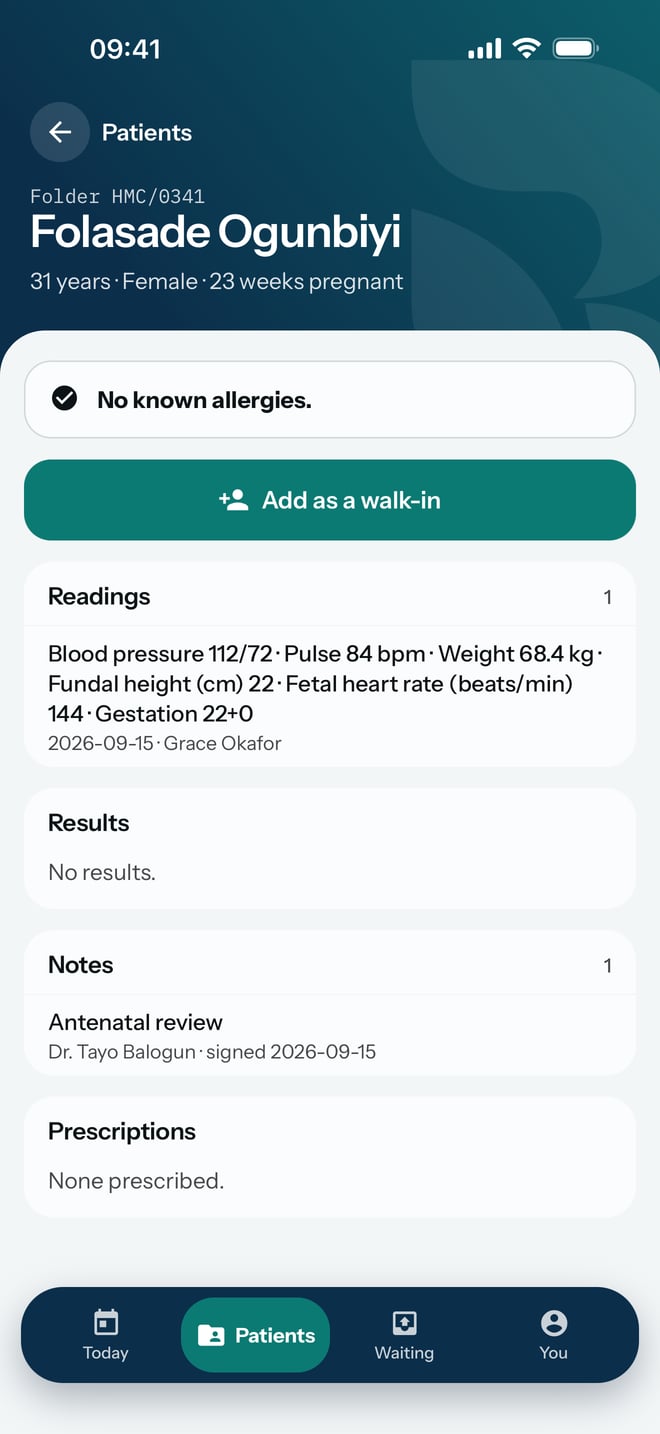
The chart opens with the folder number, name, age and sex at the top, and the allergy line first underneath. Below it come Readings, Results, Notes and Prescriptions, each with a count. A result nobody has reviewed yet shows Waiting for review.
If the patient is here today, the chart offers Open today's visit. If they are booked but have not arrived, it offers Record arrival, and otherwise Add as a walk-in.