Add a walk-in from the phone
Put a patient who arrived without an appointment on today's list, from anywhere in the practice.
- Where
- Practice phone app
- Who can do this
- Administrator, Doctor, Midwife, Nurse, Reception and Staff
When a patient comes in without an appointment, add them as a walk-in. They join Waiting to be seen on Today, and everybody in the practice sees them there.
Before you start
The patient must already be registered with the practice. Search for them first; most patients who walk in have been before.
Steps
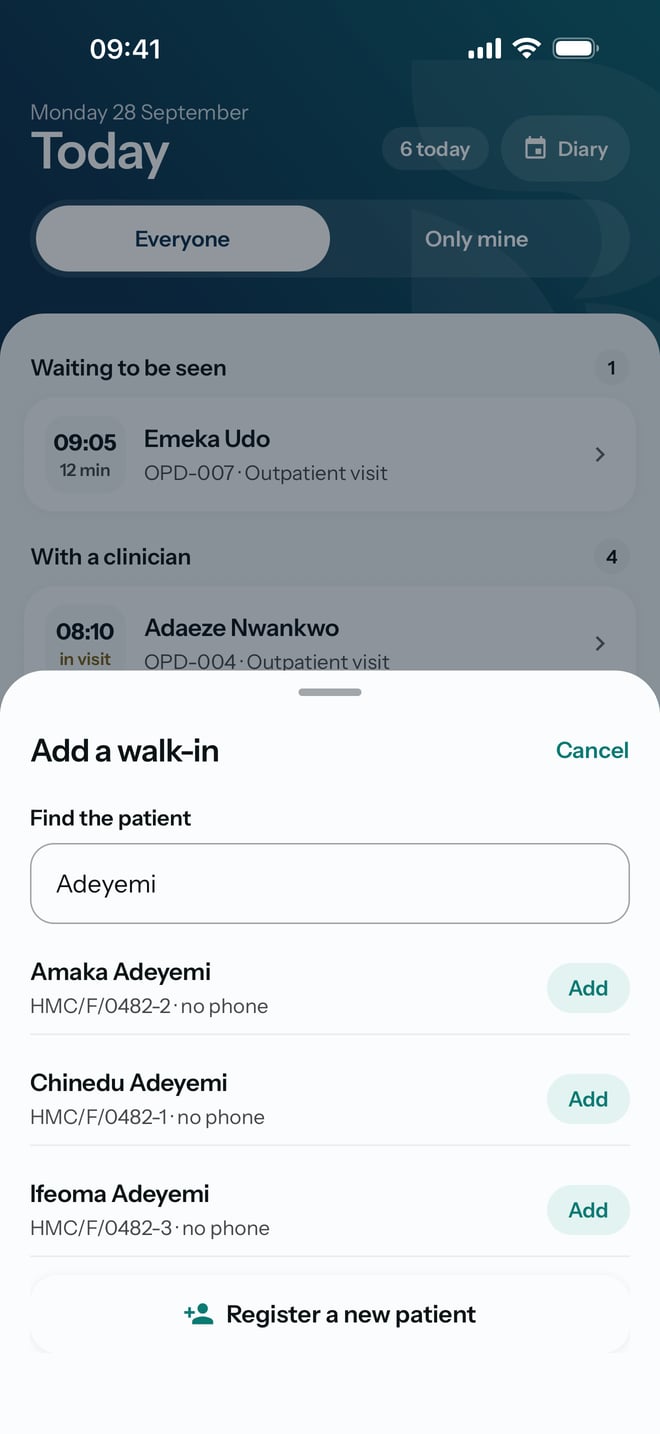
- On Today, tap Add a walk-in.
- In Find the patient, type part of their name, their folder number or their phone number.
- Find the right patient in the list. Check the folder number under the name.
- Tap Add beside them.
What to expect
The sheet closes and the patient appears under Waiting to be seen, with the time they arrived. The row shows Saved here at first, then Accepted once the practice has it. You can carry on while it sends.
If the patient is not in the list, check the spelling or search by folder number instead.