See who is waiting on Today
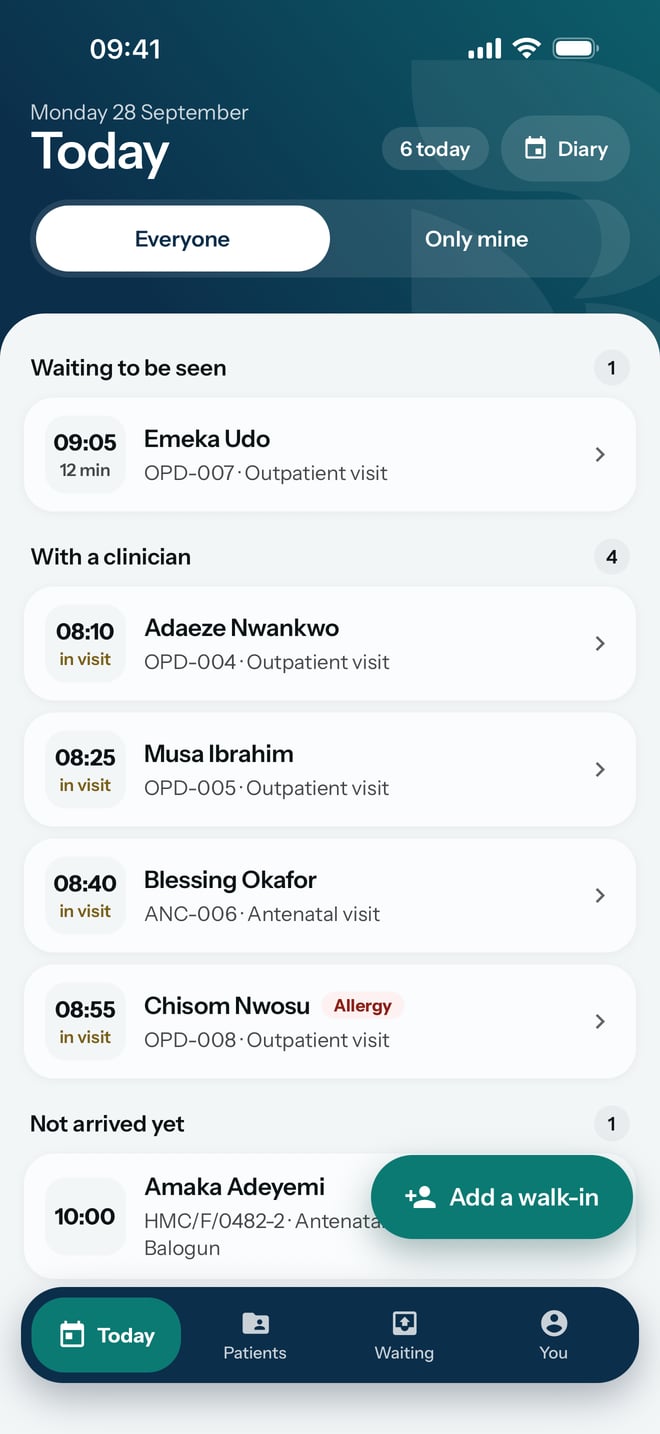
Read the day's patients on the phone, grouped by where each one is, and open the one you need.
- Where
- Practice phone app
- Who can do this
- Administrator, Doctor, Midwife, Nurse, Reception, Billing and Staff
Today is the first screen after you open RizCare. It shows every patient on today's list and where each one has got to, so you can see at a glance who is waiting and for how long.
Steps
- Tap Today at the bottom of the screen.
- Read the groups, from the top: Waiting to be seen, With a clinician, Not arrived yet and Completed. A group only shows when somebody is in it.
- To see only your own patients, tap Only mine. Tap Everyone to see the whole list again.
- Tap a patient to open them.
What to expect
Each row shows the time, the patient's name, their folder number and the reason for the visit. Under the time, a waiting patient shows how many minutes they have waited, and a patient with a clinician shows in visit. A red Allergy label beside a name means the patient has a recorded allergy.
Tapping a patient who has arrived opens their visit. Tapping a patient who has not arrived opens their chart, where you can record the arrival.
The count at the top says how many patients are on today's list, and Diary opens the appointments for any day.