Mark a lab result as reviewed
Read a returned lab report on the patient's visit and record, in your own words, what you took from it.
- Where
- Practice phone app
- Who can do this
- Doctor, Midwife and Staff
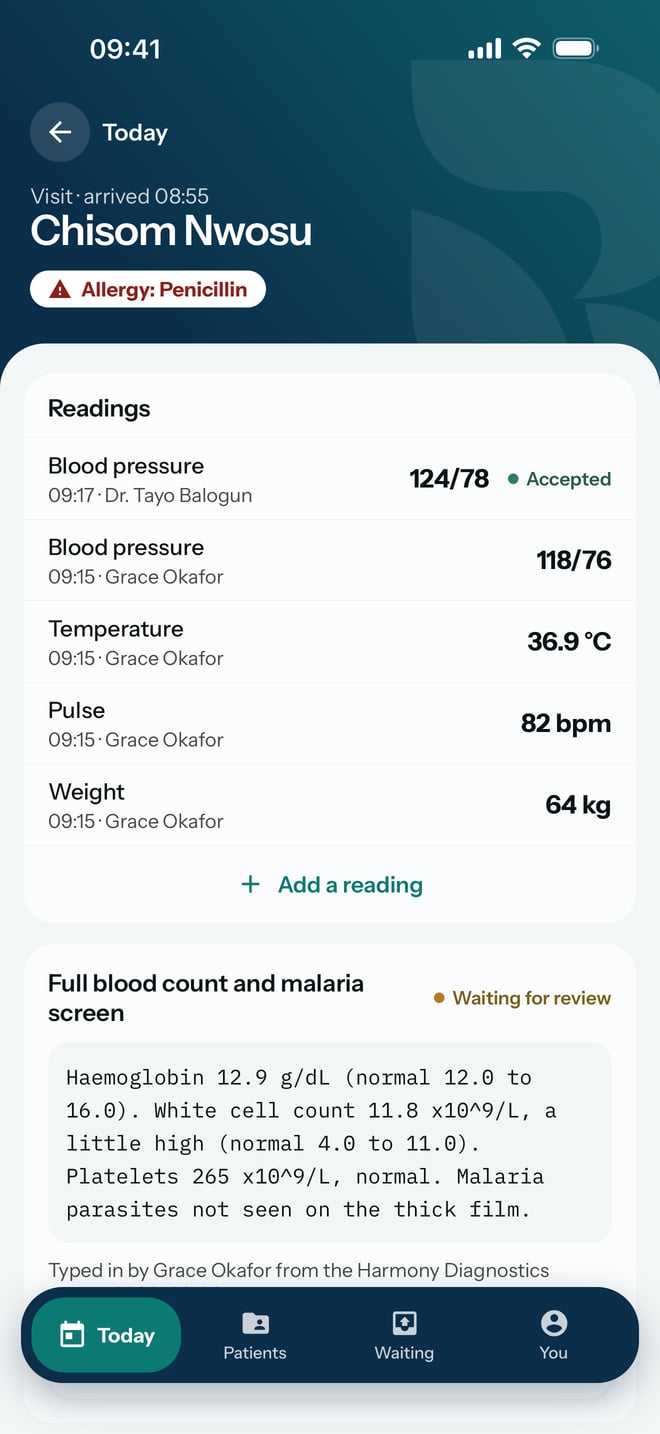
When a colleague types in a report from an outside laboratory, it waits on the patient's visit marked Waiting for review until a clinician reads it. Reviewing it on the phone means the result does not sit unread while you are away from a computer.
Before you start
Only clinicians who may review results see Mark as reviewed. By default that is doctors, midwives and staff accounts.
Steps
- Open the patient's visit from Today.
- Scroll to the result. Read the report and the line under it, which says who typed it in, from which laboratory and the date of the report.
- Tap Mark as reviewed.
- In Review note, write what you took from the report, in your own words.
- Tap Mark as reviewed on the sheet.
What to expect
The result changes from Waiting for review to Reviewed on the visit, and Mark as reviewed goes away. The report text itself does not change. The review is saved on the phone first and sent to the practice like the rest of your work.